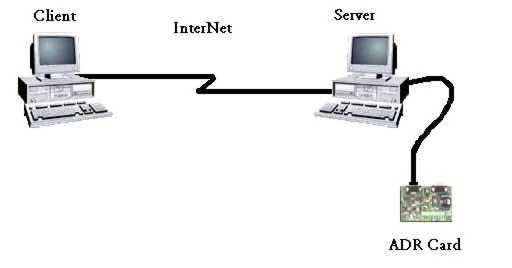
CAVEAT: This document assumes that you are familiar with ANSI C programming. It is intended as a brief introduction to the concept of TCP/IP socket access to ADR cards. The sample code is provided for demonstration purposes only. Although the programs compile and run they are not a complete implementation. There are various links on this page to supporting documentation. Use your "BACK" button to return to this page.
Client/Server Using a Remote ADR Card Over TCP/IP
This section will demonstrate how to access an ADR card connected to a serial port on a remote computer. Communication is via TCP/IP sockets. The example uses ANSI C code running in a Microsoft Windows environment. Both the client and server ends of the link are shown. This example uses a slightly modified version of the serial com port code that is shown on the programming page for Visual C++ with MFC.
Background
I am a Windows programmer at one of Ontrak's clients. After I wrote the web page showing how we access an ADR card using Visual C++, I was requested to write a page about TCP/IP. This code works with all current ADR cards and commands.
This example is based on code that I use whenever I am trying out TCP/IP in a new environment. Adding support for the ADR card was simple, especially since the code does not include rigorous error handling.
The sample code was tested on Windows NT, 95 and 98. I make no effort to explain all of the parameters used in the various API calls. Please refer to the documentation provided with your compiler.
Note that the description of Internet components has been greatly simplified for readability. Never-the-less readers cognizant of networking concepts may find it ponderous; please bear with me as I try to guide the neophytes through this topic. Feel free to skip ahead.
Sample Overview
This section explains what the sample programs are trying to achieve.
A user on a remote client computer types in a command for an ADR card. The command is transmitted across the network to a server computer. The server computer passes the command to a locally attached ADR card. The response from the ADR card is sent back across the network for display to the user of the remote client computer.
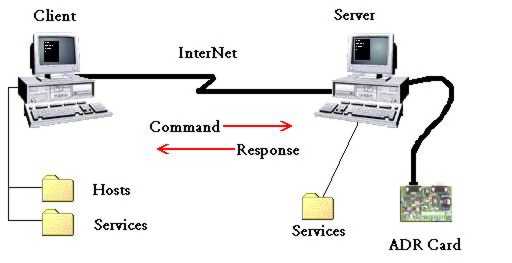
Click on the items in the picture for more details.
Server Overview
The server program is called ADRSockSrv.exe. The server program runs on the computer that has the ADR card attached.
ADRSockSrv looks up the port number for ADRlink in the Services file, creates a socket and listens for client connections. When a client connection is accepted ADRSockSrv receives the command that was sent by the client. The command is passed to the ADR card by writing it to the serial port. The response is read from the serial port and sent back to the client. The server then waits for the next client connection.
Client Overview
The client program is cleverly called ADRSockClient.exe. The client program runs on a remote computer that is connected to the server computer by an Internetwork.
ADRSockClient looks in the Hosts file for the IP address of the server. ADRSockClient looks in the Services file for the port number of the ADRlink service. A socket-address structure is loaded with the server IP address and ADRlink port number. A socket is created and bound to the server's socket-address. ADRSockClient connects to the server using the socket. The response parameter and the command parameter that the user typed are concatenated together to become a message. The message is sent to the server. ADRSockClient then receives the response and displays it.
Services File

The Services file provides the port numbers for services. It contains entries for "well-known" services. We add our service, ADRlink, to this file as port number 20025/tcp. Both the client and server computers must have the same port number in the Services file on each machine. ADRSockSrv will listen for clients that try to connect to the server computer on port number 20025.
Hosts File
The Hosts file provides IP addresses for computer names. It allows us to refer to a computer by its name instead of its IP address. We add the name of our server computer to this file along with its IP address. (Huh? what's my IP address)
Only the Hosts file on the client computer needs to change. The server computer returns the response over the connection that the client created.
Client-Server Interactions
- ADRSockSrv listens for connections on the ADRlink port.
- ADRSockClient connects to the ADRlink port on the server computer.
- ADRSockSrv accepts the connection on the ADRlink port.
- ADRSockClient sends the command to ADRSockSrv
- ADRSockSrv receives the command and writes it to the serial port (ADR card)
- ADRSockSrv reads the serial port to get the response from the ADR card
- ADRSockSrv sends the response to ADRSockClient over the existing connection
- ADRSockClient receives the response and displays it
Let's See Some Code Already
Even though this will seem like a verbose description, believe me, it is only the nickel tour about using the TCP/IP protocol.
I will explain the server example program first.
Server Program Code

Now we can look at the client example program.
Client Program Code
If you have difficulties with the ADR Sockets example you may find some assistance on the trouble shooting page.
Trouble Shooting

You can skip the brief discussion of a few advanced topics. The page merely expands on items that have already been introduced.
A Few Advanced Topics
I hope that this assists you in your programming efforts.
John Homppi 
To retrieve the source code used in this example in ZIP format, click ADRSocket Demo.