The hosts file is used to translate human readable computer names into dotted octet internet addresses. It over-rides any entries in external routing tables.
SUGGESTION: Save a copy of the hosts file BEFORE you start changing it. Your network admin will not be pleased if you call for help after mucking up the file."
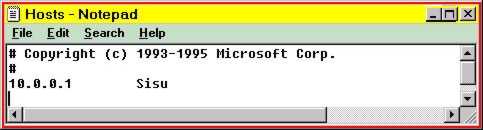
This image show the hosts file being edited by Notepad.
Note that the computer named sisu is set to address 10.0.0.1
WINDOWS NT NOTES
The Hosts file is located at C:\WINNT\SYSTEM32\DRIVERS\ETC\HOSTS
WINDOWS 95 NOTES
The Hosts file is located at C:\WINDOWS\HOSTS
WINDOWS 98 NOTES
The Hosts file is located at C:\WINDOWS\HOSTS
When we tested the client on a Windows 98 machine, it repeatedly tried to dial out, even though we were connecting to a machine on the LAN. We just cancelled each dial-out attempt and the client continued processing with the server address in the Hosts file. I suspect that the Windows 98 machine was configured to always use the DNS server on an ISP. However, I use NT so I do not know how to disable this.....we already tried disabling the obvious settings in the Windows 98 Control Panel.