ShowAduDeviceList
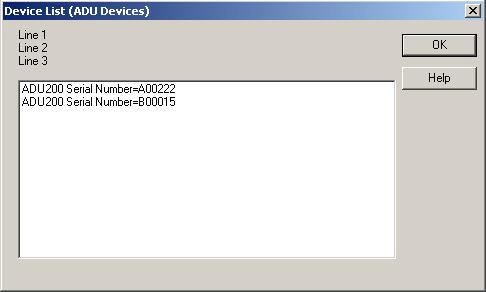
The ShowAduDeviceList function displays a list of ADU devices connected to the computer. Call this function to let the user see the product ids and serial numbers of connected ADU devices.
If a pointer to an ADU_DEVICE_ID structure is provided in the call then the user can select an ADU device from the list and its identifiers will be returned to the calling program.
If the user did not select a device then the ADU_DEVICE_ID structure will be filled with hex zeroes after the ShowAduDeviceList function returns.
C Declaration:
void __stdcall ShowAduDeviceList(ADU_DEVICE_ID* pAduDeviceId,
char* psPrompt);
Visual Basic Declaration:
Declare Function ShowAduDeviceList Lib "AduHid.DLL" _
(ByRef pAduDeviceId As ADU_DEVICE_ID, _
ByVal sPrompt As Any) As Long
Arguments:
Return Codes:
None
Notes
The prompt string is limited to 255 characters and up to 3 lines. Use newline
characters to delimit a line.
(newline = \n = 0x0a)
Example
The instruction
ShowAduDeviceList(NULL, "Line 1\nLine 2\nLine 3");
will show: