 AduHidTest Program
The AduHidTest program demonstrates the use of the AduHid DLL. The buttons on the
screen correspond to the functions supported by the AduHid.DLL.
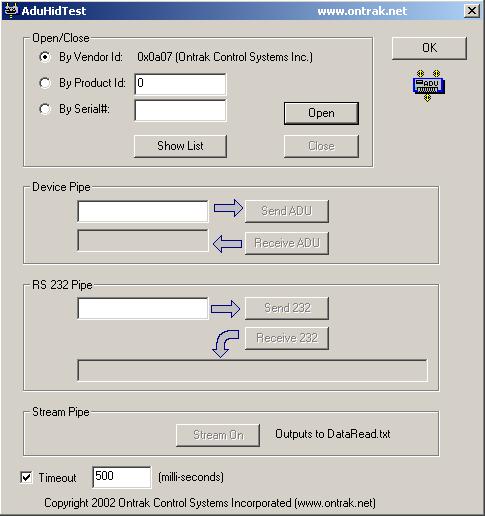
To use the AduHidTest program:
- Open the connections to the ADU device.
- Send a command to the ADU device.
- Receive a response from the ADU device.
- Close the connections to the ADU device.
Opening the Connections
If only one Ontrak ADU device is attached to the computer then click "Open By Vendor".
If more than one ADU device is attached to the computer then either :
specify the "Product Id" and click "Open by Product Id"
or
specify the "Serial Number" and click "Open by Serial#"
Click the "Open" button.
When the connection is opened the "Open" button is disabled and the
"Close" button is enabled.
If the connection does not open check:
- the cable to the ADU device
- ensure the serial number is correctly typed
- ensure the product id is correctly typed
Note: the product id is the numeric portion of the ADU model number.
(I.E. model ADU200 is product id 200)
The "Show List" button displays a list of ADU devices that are attached to
the computer.
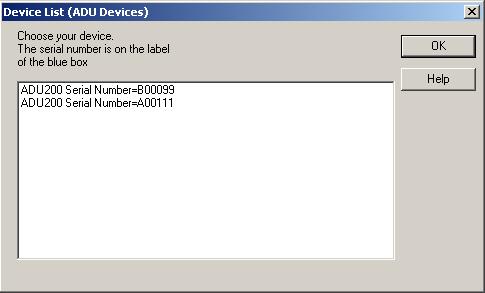
Select one of the listed devices and the product id and serial number are copied into the identifier fields of the AduHidTest screen. Then click either "Open by Product Id" or "Open by Serial Number".
Sending a Command
Commands are sent to the ADU device via the Device pipe. Type the ADU command into the field beside the "Send ADU" button. Click "Send ADU" to transmit the command to the ADU device.
Receiving a Response
Click "Receive ADU" to receive the response to the command. Not all commands result in a response. See the manual for the ADU model.
Closing the Connections
Click "Close" to terminate the connection to the ADU device.
Example
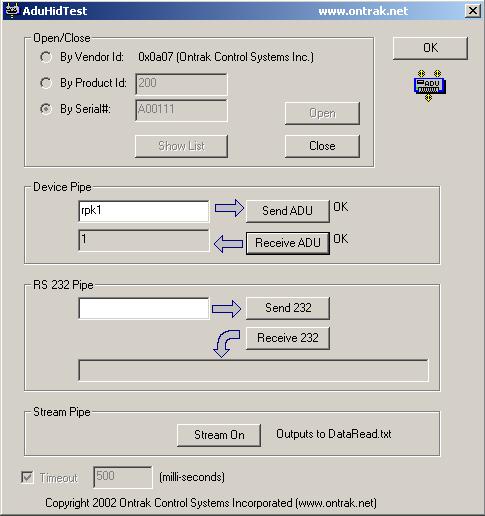
The screen shot shows the result of sending an "rpk1" command to the ADU
device and receiving the response.
Data Streaming
Click "Stream On" to start streaming.
Click "Stream Off" to stop streaming.
No data is streamed until a command to start streaming is written to the ADU device pipe. (I.E. the "Stream On" button causes the AduHidTest program on the personal computer to start listening for data. It does not cause the ADU device to begin sending data.)
Check the documentation for specific models of ADU devices to determine if streaming is available. Each ADU model has its own commands to start and stop streaming.
The data read from the stream is written to DataRead.txt in the directory that AduHidTest is executed from.
AduHidTest Buttons - AduHid.DLL Functions
Each button on the screen and the functions it calls in AduHid.DLL.
Vendor Id
The vendor id of 0x0a07 is the number assigned to Ontrak Control Systems Incorporated by the USB Implementers Forum Incorporated.