|
 ADU Data Acquisition Interface Products
The AduHid DLL can be used directly from a Visual Basic
.NET
application including VB2010 Express. Some adjustments must be made to the Visual Basic code
to allow execution within the Common Language Runtime.
The zip file, AduHid-Eg-VB-Net.ZIP, contains a sample Visual
Basic project that was converted from VB6.0 to VB.net and then to VB2010
Express using
the automated upgrade tool provided with VB2010.
All source code is provided so that you may review details that
are not highlighted here.
The resulting executable, Project1.exe, was tested under
Windows XP and Windows 7
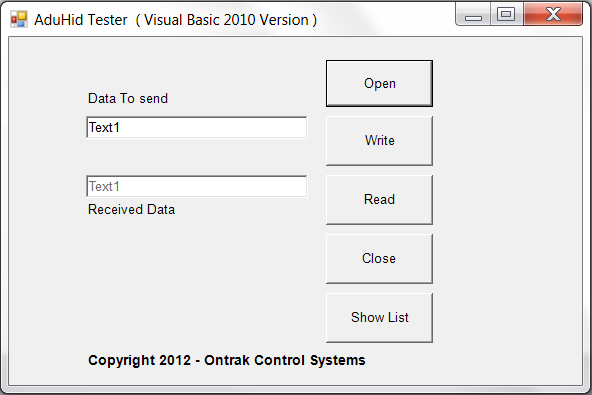 Figure
1. AduHid Tester VB2010 version Figure
1. AduHid Tester VB2010 version
The program is a minimal redition of our ADUHIDTest
program to demonstrate the proper method to
utilize the functions within the ADUHID DLL.
IMPORTANT:
The sample program provided
requires access to the ADUHID DLL. To enable this
you should run the VB environment with Administrator
privileges. To open VB2010 express with
Administrator privileges, right click the program in
your start menu and select :Run As Administrator
See Figure 2.
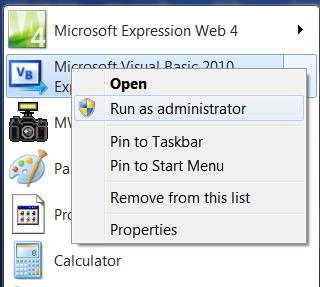 Figure
2: Starting VB2010 using Right Click to Run as
administrator Figure
2: Starting VB2010 using Right Click to Run as
administrator
Highlights of changes: VB6 to VB.NET
including VB2010
---------------------------------------------------------------------------------------------------------
1) Change the sSerialNumber declaration in the ADU_DEVICE_ID
structure so that it includes marshalling arguments.
The delcaration should read as follows.
<VBFixedString(7),System.Runtime.InteropServices.MarshalAs
(System.Runtime.InteropServices.UnmanagedType.ByValTStr,SizeConst:=7)> Public
sSerialNumber As String
2) Change the declaration of the ShowList function so that sPrompt
has a type of String.
The declaration should read as follows.
Declare Function ShowAduDeviceList Lib "AduHid.DLL" (ByRef pAduDeviceId As
ADU_DEVICE_ID, ByVal sPrompt As String) As Integer
NOTES:
---------------------------------------------------------------------------------------------------------
The AduHid DLL is a legacy DLL. It is not a COM object.
It is not an "assembly".
DO NOT specify the the AduHid DLL as a reference.
(ie DO NOT use -r on the command line for AduHid.dll)
The AduHid.dll must be copied into the sub-directory that
contains the EXE file.
(ie. in the example the "Project1.NET/bin" sub-directory contains both
the Project1.exe AND AduHid.dll)
DOWNLOAD VB.NET Example Files in
ZIP format for 32-Bit Development. ( 65K )
DOWNLOAD VB.NET Example Files in
ZIP format for 64-Bit Development. ( 65K )
|