This page will demonstrate how to send and receive data from the ADR112 or any other ADR interface, using Linux gcc programmes. It shows the commands used to configure the serial port, send data out through the serial port, and receive data through the serial port.
Additional help is available from the Linux HowTo documents found at a variety of locations around the web (hint: use a search engine). The man pages of your Linux system are invaluable as well. I make no effort to explain all of the parameters used in the various API calls. Read The Famous Manual.
This page is divided into several sections. The first section presents the source code with brief usage details. The second section shows pictorial examples and screen shots. Some troubleshooting hints are given in the second section. The third section describes some details (skip it if the first two sections provide what you need.)
Linux Version
I tested this program using Redhat 7.3, however I believe this code will operate correctly under all recent Linux kernels (your mileage may vary). The code was compiled with version 2.96-110 of the gcc compiler. Any recent vintage of the gcc compiler should be fine.
Source Code
There are four files needed to compile the Linux example.
- adrport.h
- adrport.c
- adrserial.c
- Makefile
adrport.h
// adrport.h
// Copyright MMI, MMII by Sisusypro Incorporated

int OpenAdrPort (char* sPortNumber);
int WriteAdrPort(char* psOutput);
int ReadAdrPort(char* psResponse, int iMax);
void CloseAdrPort();
adrport.c
// adrport.c - Serial Port Handler
// Copyright MMI, MMII by Sisusypro Incorporated

// Permission is hereby granted to freely copy,
// modify, utilize and distribute this example in
// whatever manner you desire without restriction.

#include <stdio.h>
#include <unistd.h>
#include <sys/types.h>
#include <sys/stat.h>
#include <fcntl.h>
#include <termios.h>
#include <string.h>
#include <errno.h>
#include "adrport.h"
static int fd = 0;

// opens the serial port
// return code:
//   > 0 = fd for the port
//   -1 = open failed
int OpenAdrPort(char* sPortNumber)
{
    char sPortName[64];
    printf("in OpenAdrPort port#=%s\n", sPortNumber);
    sprintf(sPortName, "/dev/ttyS%s", sPortNumber);
    printf("sPortName=%s\n", sPortName);

    // make sure port is closed
    CloseAdrPort(fd);

    fd = open(sPortName, O_RDWR | O_NOCTTY | O_NDELAY);
    if (fd < 0)
    {
        printf("open error %d %s\n", errno, strerror(errno));
    }
    else
    {
        struct termios my_termios;
        printf("fd is %d\n", fd);
        tcgetattr(fd, &my_termios);
        // NOTE: you may want to save the port attributes
        //       here so that you can restore them later
        printf("old cflag=%08x\n", my_termios.c_cflag);
        printf("old oflag=%08x\n", my_termios.c_oflag);
        printf("old iflag=%08x\n", my_termios.c_iflag);
        printf("old lflag=%08x\n", my_termios.c_lflag);
        printf("old line=%02x\n", my_termios.c_line);

        tcflush(fd, TCIFLUSH);

        my_termios.c_cflag = B9600 | CS8 |CREAD | CLOCAL | HUPCL;

        cfsetospeed(&my_termios, B9600);
        tcsetattr(fd, TCSANOW, &my_termios);

        printf("new cflag=%08x\n", my_termios.c_cflag);
        printf("new oflag=%08x\n", my_termios.c_oflag);
        printf("new iflag=%08x\n", my_termios.c_iflag);
        printf("new lflag=%08x\n", my_termios.c_lflag);
        printf("new line=%02x\n", my_termios.c_line);
    } // end if
    return fd;
} // end OpenAdrPort

// writes zero terminated string to the serial port
// return code:
//   >= 0 = number of characters written
//   -1 = write failed
int WriteAdrPort(char* psOutput)
{
    int iOut;
    if (fd < 1)
    {
        printf(" port is not open\n");
        return -1;
    } // end if
    iOut = write(fd, psOutput, strlen(psOutput));
    if (iOut < 0)
    {
        printf("write error %d %s\n", errno, strerror(errno));
    }
    else
    {
    	printf("wrote %d chars: %s\n", iOut, psOutput);
    } // end if
    return iOut;
} // end WriteAdrPort

// read string from the serial port
// return code:
//   >= 0 = number of characters read
//   -1 = read failed
int ReadAdrPort(char* psResponse, int iMax)
{
    int iIn;
    printf("in ReadAdrPort iMax=%d\n", iMax);
    if (fd < 1)
    {
        printf(" port is not open\n");
        return -1;
    } // end if
    strncpy (psResponse, "N/A", iMax<4?iMax:4);
    iIn = read(fd, psResponse, iMax-1);
    if (iIn < 0)
    {
    	if (errno == EAGAIN)
    	{
		return 0; // assume that command generated no response
	}
	else
	{
		printf("read error %d %s\n", errno, strerror(errno));
	} // end if
    }
    else
    {
    	psResponse[iIn<iMax?iIn:iMax] = '\0';
	    printf("read %d chars: %s\n", iIn, psResponse);
    } // end if

    return iIn;
} // end ReadAdrPort

// closes the serial port
void CloseAdrPort()
{
	// you may want to restore the saved port attributes
    if (fd > 0)
    {
        close(fd);
    } // end if
} // end CloseAdrPort
adrserial.c
// adrserial.c - Serial Port Test Example
// Copyright MMII by Sisusypro Incorporated

// WARNING: Example only. Lacks error checking!
#include <stdio.h>
#include <stdlib.h>
#include <string.h>
#include <unistd.h>
#include "adrport.h"

// this is the mainline thingee
int main(int argc, char *argv[])
{
	char sCmd[254];
	char sResult[254];
	if (argc < 2 || argc > 2)
	{
		printf("adrserial needs 1 parameter for the serial port\n");
		printf("  ie. use 'adrserial 0' to connect to /dev/ttyS0\n");
		return 0;
	} // end if
	printf("Type q to quit.\n\n");
	if (OpenAdrPort(argv[1]) < 0) return 0;
	while (1)
	{
		int iSpot;

		printf("?:");
		gets(sCmd);
		if (sCmd[0] == 'q' || sCmd[0] == 'Q') return 0;
		iSpot = strlen(sCmd);
		sCmd[iSpot] = 0x0d; // stick a <CR> after the command
		sCmd[iSpot+1] = 0x00; // terminate the string properly
		if (WriteAdrPort(sCmd) < 0) return 0;
		sleep(1); // give the ADR card some time to respond
		if (ReadAdrPort(sResult,254) > 0)
		{
			printf("****Response is %s\n", sResult);
		} // end if
	} // end while

	CloseAdrPort();

} // end main
Makefile
CFLAGS=-g -Wall
adrserial: adrserial.c adrport.c
	gcc -g -c -Wall adrserial.c -o adrserial.o
	gcc -g -c -Wall adrport.c -o adrport.o
	gcc adrport.o adrserial.o -o adrserial
Ontrak will send you a tarred and gzipped version of the above files (see bottom of this page), but it includes nothing beyond what is listed above.
Building the Linux Example
- Copy the four source files into a single directory. (or expand LinuxEg.tar.gz)
- To compile type "make" at the shell prompt.
Running the adrserial Example
Permissions
First off, you have to grant permission to access the serial port. On my system I
logged in with root authority and used chmod to grant all users read/write access to the
serial port.
chmod o+rw /dev/ttyS0
The adrserial programme has a single parameter: the numeric value for the selected serial port. On my system the ADR card is connected to the first serial port which is known as /dev/ttyS0 in Linux. (please adjust the following instructions to match your system.)
- Type "./adrserial 0" at the shell prompt to run the example.
Some debugging information will appear followed by "?:" (a prompt for commands) - Type in a command for the ADR card and press enter.
The command is written to the port and any response is displayed. - Type "q" to shut down the adrserial programme.
Pictorials
Here is the ADR112 card that I used to test this programme.
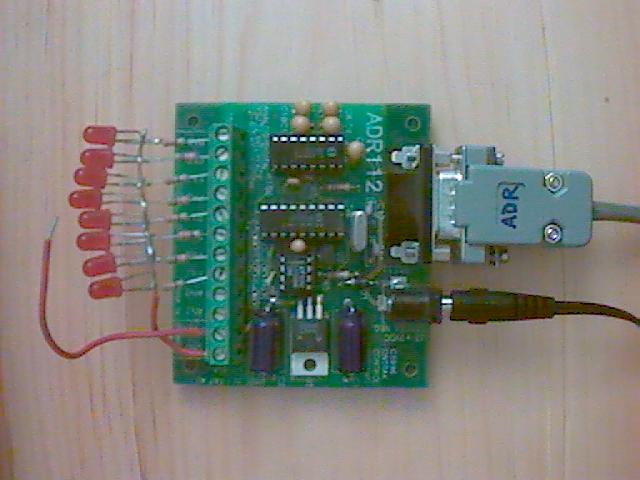
There are several things to notice in the picture.
- The LEDs are wired to PortA of the ADR112 card. There are 8 LEDs, one for each of PA0 through PA7.
- Current limiting resistors protect the LEDs from burnout.
- The ADR card requires a special serial cable. Thus I wrote "ADR" on the DB9 connector so I can easily identify it (versus loopback and straight-thru cables.)
- The loose red wire is attached to the +5V supply. It allows me to pull an I/O line high during testing.
Here is a screen-shot of the adrserial programme starting up.
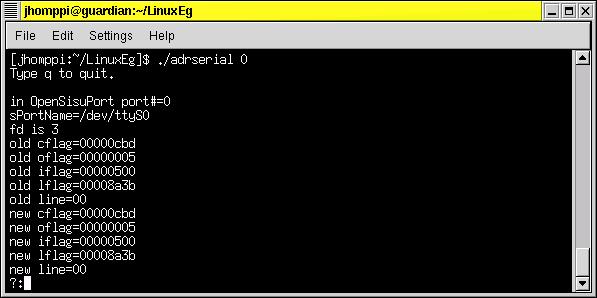
It commences with the command
./adrserial 0
followed by a number of lines of debug information. The ?: is a prompt to enter a command for the ADR112.
Here is a screen-shot of 2 ADR commands.
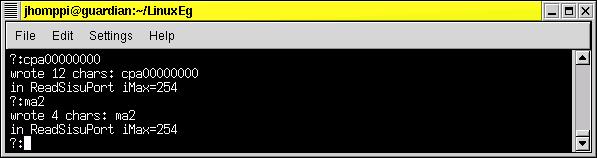
The first command, cpa00000000, sets PortA into output mode.
The second command, ma2, turns on the PA1 I/O line of the ADR card.
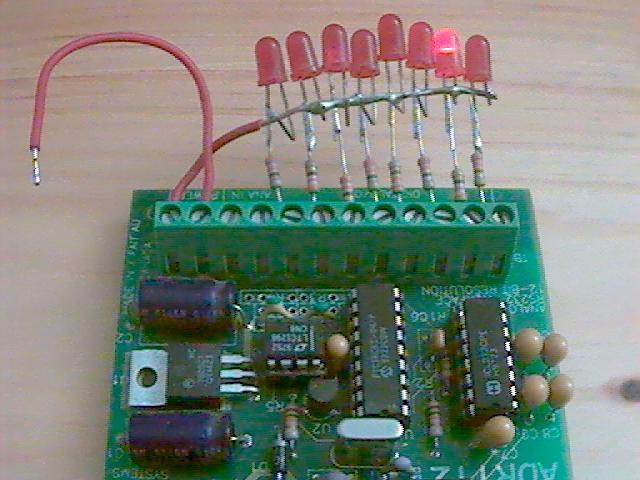
After these two commands the LED connected to PA1 is lit up.
The rpa command instructs the ADR card to report the status of all 8 lines on PortA.
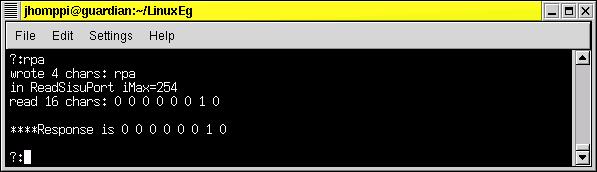
The above screen-shot shows that PA1 is high (on) and all other PortA lines are low (off).
Prior to the next command I used the red wire to feed +5 volts to PA7. This caused the
LED on PA7 to light up.
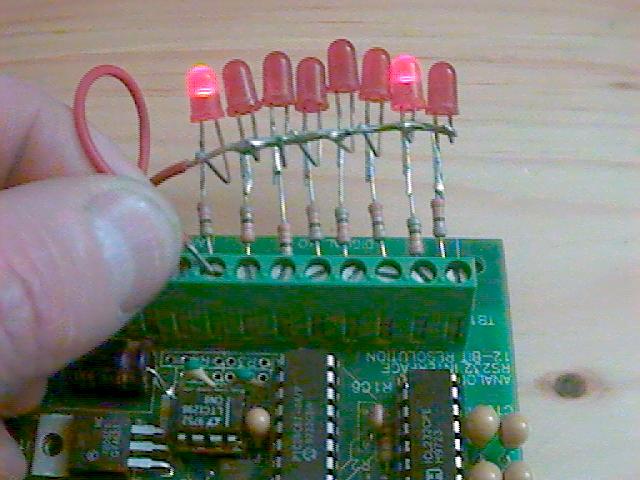
Notice how both the LEDs on PA7 and PA1 are lit up. PA1 was turned on by the earlier ma2
command and PA7 is lit up by the current flowing in the red jumper wire.
An rpa command was sent to the ADR card eliciting the following response. 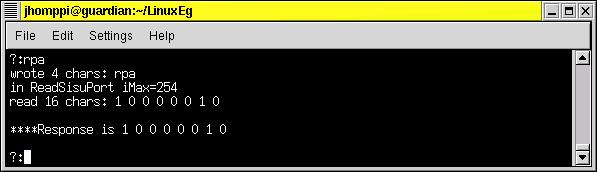
This shows the ADR card reporting that line PA1 and line PA7 are high (on). All other
lines on PortA are low (off).
Trouble Shooting (things that can go wrong)
- Specifying the wrong port number. In Linux the ports are numbered from 0 unlike Windows where port numbering begins at 1.
- Using the right port number but the wrong connector. Ensure that the cable is connected to the right DB9 connector on the back of the PC.
- Using the wrong cable. ADR cards use a special cable. Normal serial cables will not work. (after I clearly labelled my ADR cables this problem disappeared... hint, hint)
- Using malformed ADR commands.The ADR card will silently fail to honour malformed commands. Thus a cpa command must be followed by exactly 8 digits plus a carriage return. If a digit is left out then the command is ignored. Ditto for the ma command if the decimal value is larger than 255.
- 1 means input, 0 means output.If the port is configured incorrectly then unexpected results occur. Microchip suggests a memory aid: 1 is like an I for Input and 0 is like an O for Output.
- Error Codes.The programme bails on any unexpected condition. Fortunately it displays an error code for each failure. Check your local man pages for the failing API to determine the cause of failure. Of course your application will have to deal with problems in a way appropriate to your environment. Ideally a production programme should never bail but should gracefully handle errors.
- Compiler Warning. The gcc compiler emits a warning "the gets function is dangerous and should not be used." This warning is expected and OK for a tutorial sample. Your application will have its own mechanism for invoking commands.
- Read Error: EAGAIN. For the sake of simplicity the adrserial demo does not try to differentiate between commands that evoke a response from the ADR card and those that do not. The demo simply tries to read a response after every write. If no response is forthcoming then the EAGAIN errno is generated by the library routines. It is best if your application avoids reading after writing a command to which there is no response.
Additional Details
The remainder of this page contains some additional details that you may skip at your discretion. Some of this is directed at Linux newbies.
Support
Do not call Ontrak and for help about this example. It is provided as a courtesy to show the operation of an ADR card in the Linux environment. It is not supported.
Screen-Shots
All the screen-shots show an xterm session running on a Gnome desktop. The caption bar shows the userid, jhomppi, and the machine name, guardian. (This machine normally operates as an Internet firewall.... hence guardian is its name).
The shell prompt is the userid followed by the directory in which the example resides:
[jhomppi:~/LinuxEg]$
The current directory (ie dot) is not in the path. Thus it must be specified in the command to start the programme:
./adrserial 0
The programme can be run from a normal tty console session (ie. command line). You do not need to start an xterm. You do not need to start the x-window environment.
Interpreting Error Codes
When you have a numeric error code you will find that all of the man pages refer to #defined constants (eg EAGAIN). The /usr/include header files help you translate an error number into its constant.
On our development system (Redhat Linux 7.3) the file /usr/include/asm/errno.h contains a long list of defined error constants. Looking up the EAGAIN constant shows a value of 11.
Searching For Error Codes. You can use the "find" and "grep" commands to locate all the headers referring to a given defined constant. For example, the header files that refer to the EAGAIN constant can be listed with the following command:
find /usr/include -exec grep -l 'EAGAIN' {} \;
Many Thanks
This example is based on information gleaned from many Internet Web sites. Special
accolades go to the following.
Thanks to all of the Linux and gcc developers, documenters and testers.
Thanks to Michael R. Sweet for his "Serial Port Programming Guide".
Thanks to Luis F. Guzman for explaining the "find" command on the Central
Indiana Linux Users Group page.
Thanks to Redhat for providing free ftp distribution of Linux.
Freedom
This programme is free. Free of cost. Free of restrictions. You can use it, copy it,
modify it, distribute it and include it in your own application programme.
This programme is also free of any warranty, express or implied, for fitness or
merchantability. Use at your own risk.
I hope this assists your programming efforts.
John Homppi
To retrieve the Linux files used in this example (200K ) in ZIP format, click "LINUX EXAMPLE"
After you receive the LinuxEg.tar.gz file you must decompress it with:
gunzip LinuxEg.tar.gz
and then untar it with:
tar -xvf LinuxEg.tar