|
ADRCOM is a FREE terminal emulation program available from Ontrak
Control Systems that allows simple ASCII commands to be sent and received via a serial
port. It can be used to verify hardware connection of an ADR device and familiarize
programmers with the ASCII commands used with the interfaces. In this example an
ADR112 is connected to com1.
 ADR112 ADR112
To use ADRCOM, download the software and UNZIP to your local hard
drive. Simply, doubleclick the ADRCOM icon and the terminal program will load. Select your
com port using the port pull down menu and click CONNECT.
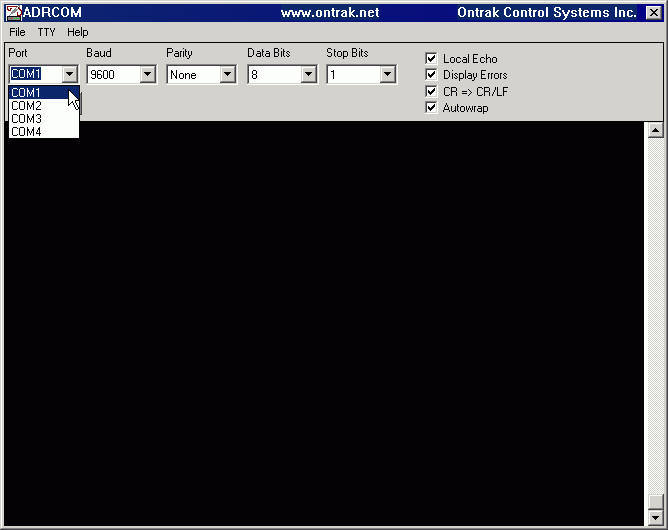
Figure 1 : Selecting COM Port
NOTE: If the port
selected is in use, or is not present, an error message will be shown. Ensure that
you are selecting a valid COM port that is connected to an ADR interface device.
Once connected, you may simply type commands as listed in the ADR
manual and read results on the terminal screen. In the example below, "rpa" is
typed and the ADR112 responds with a binary representation of PORT A. Next,
"rd0" and "rd1" commands are used to retrieve the status of the analog
input ports.
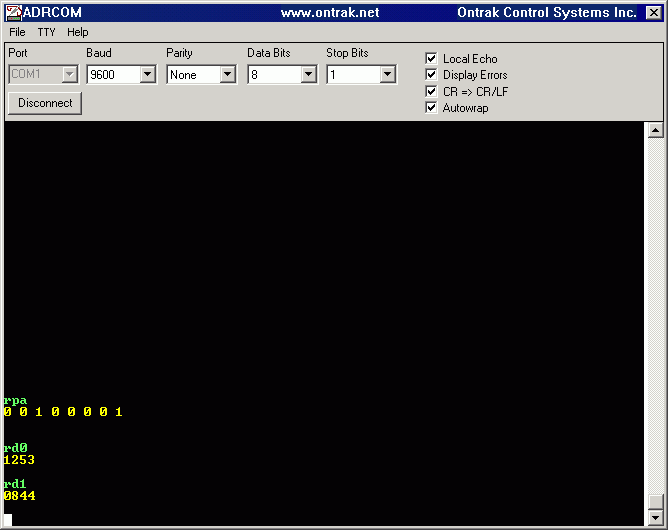
Figure 2 : Typing Comands and Viewing Responses
Download ADRCOM now.
Back to Programming Page |