|
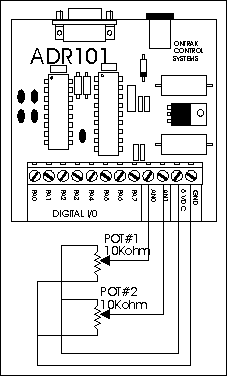
Before connecting a potentiometer to an analog input, the
potentiometer must be biased with 5 volts. This is done by simply connecting 5 volts to
one side of the pot and ground to the other. The wiper (center connection) of the pot is
then connected to one of the analog inputs. To read the pot position an RDx command is
sent to the ADR Interface . The interface will respond with position information
represented by a digital number depending on the resolution of the analog input.
000 to 255 for 8-bit inputs ( ADR101)
0000 to 1023 for 10-bit inputs ( ADR2100)
0000 to 4095 for 12-bit inputs ( ADR2000A,ADR2000B,ADR2010)
00000 to 65535 for 16-bit inputs ( ADR7700 )
 This sample
BASIC program below reads the position of the two pots using an
ADR101
and continually updates their position on the screen. This sample
BASIC program below reads the position of the two pots using an
ADR101
and continually updates their position on the screen.
10 OPEN "COM1:9600,N,8,1,CS,DS,RS" AS#1
20 CLS
30 LOCATE 1,1
40 PRINT#1, "RD0"
50 INPUT#1, POT1
60 PRINT#1, "RD1"
70 INPUT#1, POT2
80 POT1=(POT1/255)*100 :PRINT "POT#1 IS AT"POT1, "PERCENT"
90 POT2=(POT2/255)*100 :PRINT "POT#2 IS AT"POT2, "PERCENT"
100 GOTO 40
Back to Applications Page |