 Device List Example Device List Example
The following code prompts the user for 2 serial numbers. One for a strain gauge
(scale) and one for a proximity sensor (counter).
The returned serial numbers are stored for subsequent OpenAduDeviceBySerialNumber
calls. The serial numbers should also be saved in persistent storage so the serial number
selection process is used only on initial configuration.
    char szScaleSerialNumber[8];
    char szCounterSerialNumber[8];
    ADU_DEVICE_ID myAduDeviceId;

    ShowAduDeviceList(&myAduDeviceId, "Select the strain gauge");
    if (myAduDeviceId.iProductId)
    {
        strcpy(szScaleSerialNumber, myAduDeviceId.szSerialNumber);
    } // end if

    ShowAduDeviceList(&myAduDeviceId, "Select the proximity sensor");
    if (myAduDeviceId.iProductId)
    {
        strcpy(szCounterSerialNumber, myAduDeviceId.szSerialNumber);
    } // end if
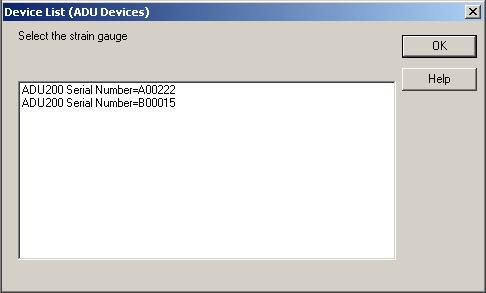
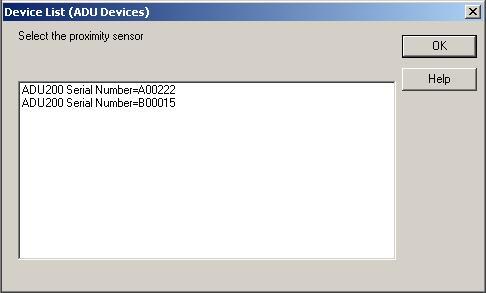
The code displays the following screens.
Note the prompt for the strain gauge.
Note the prompt for the proximity sensor.
Warning - Multiple Handles
The AduHid.DLL allows you to open multiple handles to the same ADU device. Thus
multiple processes and threads can access a single ADU device simultaneously. However the
application program must ensure that no conflicting commands are issued to the ADU device
and that all input is interpreted correctly.
Especially note the description of RS232
Command-Response Behavior.
Check to ensure that the user has not inadvertently selected the same device twice
(unless two handles to the same device are actually required).
Visual Basic Source Code
Dim iRC As Long
Dim myAduDeviceId As ADU_DEVICE_ID
Dim sScaleSerialNumber As String * 7
Dim sCounterSerialNumber As String * 7

iRC = ShowAduDeviceList(myAduDeviceId, "Select the strain gauge")
If (myAduDeviceId.iProductId > 0) Then
    sScaleSerialNumber = myAduDeviceId.sSerialNumber
End If

iRC = ShowAduDeviceList(myAduDeviceId, "Select the proximity sensor")
If (myAduDeviceId.iProductId > 0) Then
    sCounterSerialNumber = myAduDeviceId.sSerialNumber
End If
|